
Picking an LMS can feel overwhelming, especially when every tool promises to be “the best.”
That’s exactly why starting with the free version makes sense.
Before spending any money, you want to know how the platform actually sbehaves. Here are some questions to ask:
- Does building a course feel intuitive?
- Can you organize lessons the way you imagine?
- Do quizzes and progress tracking work the way you expect?
With the free versions of Creator LMS and Masteriyo LMS, you can answer all of that by simply trying them out. Create a sample course, add a few lessons, test the student experience, and see how comfortable everything feels.
Going free also removes the pressure. You’re not locked into a plan, and you’re not guessing based on feature lists alone. Instead, you get real hands-on experience.
And that’s usually what makes the decision clear.
So, in this article, I’ve talked about both free tools and a head to head comparison of the free features.
Creator LMS & Masteriyo LMS: At a Glance
Before we begin, let’s quickly introduce the two WordPress LMS plugins.
Masteriyo LMS has been in the WordPress LMS space for a while and has had time to mature. Its free version is well-known for offering a strong set of core LMS features, making it a popular choice for creators who want to get started quickly.
Creator LMS, released in 2025, is relatively new but it’s built with a modern, creator-first approach. Instead of overwhelming you with complexity, it focuses on helping course creators launch, manage, and grow courses with a clean, flexible setup.
Both plugins offer free and premium plans, and both are suitable for coaches, educators, and trainers.
In the next sections, we’ll compare Masteriyo LMS Free vs Creator LMS Free in detail – breaking down what you actually get, where they differ, and which one might fit your teaching style better.
Let’s have a look,
Creator LMS Free & Masteriyo LMS Free Feature Comparison
Initial Setup
Getting started is straightforward with both Creator LMS and Masteriyo LMS.
Each plugin comes with a guided setup wizard that walks you through the basics. This onboarding flow is especially helpful if you’re new to building an eLearning site on WordPress.
During setup, both tools allow you to choose which features you want to enable, while the system handles the technical configuration in the background. You don’t need to worry about missing anything important. The process is designed to get you up and running quickly with minimal effort.
| Feature | Creator LMS Free | Masteriyo LMS Free |
|---|---|---|
| Setup Wizard | ✅ | ✅ |
| Direct Migration From Other LMS | ✅ | ✅ |
| Starter Templates | ❌ (Upcoming) | ✅ |
| Sample Course | ❌ | ✅ |
Course Builder
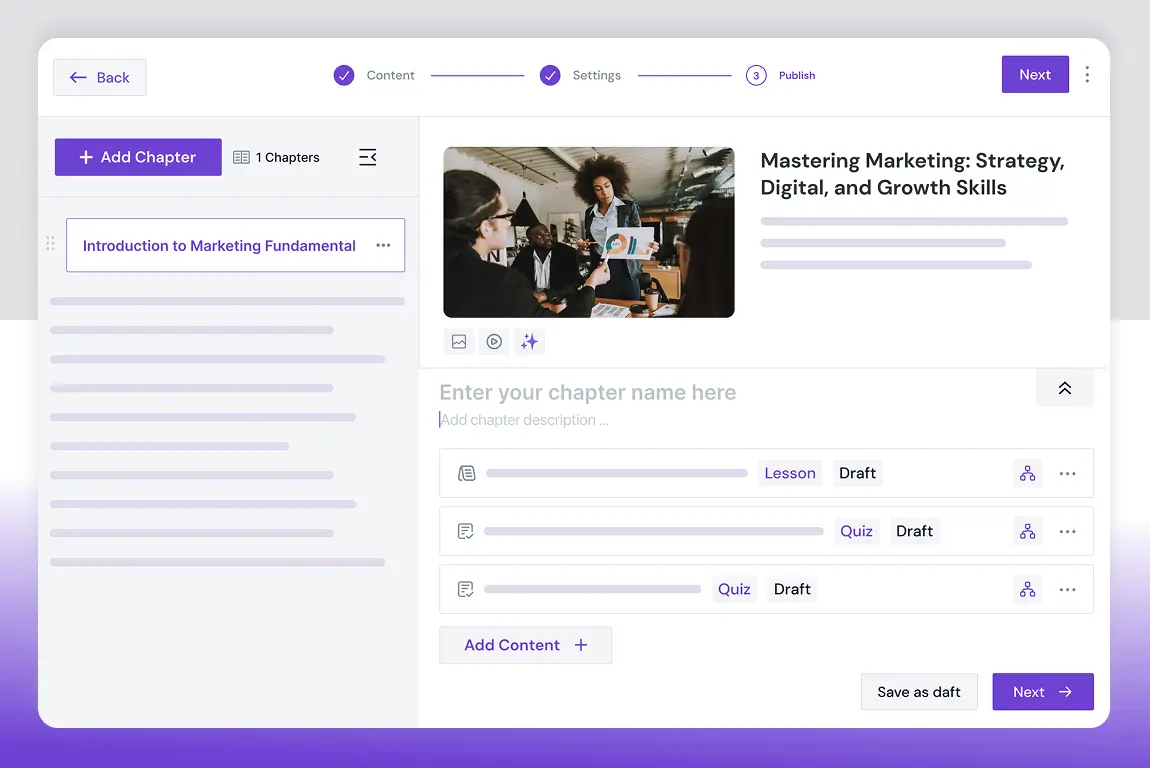
Both plugins use a dedicated course builder, keeping course creation separate from the WordPress editor.
Masteriyo LMS follows a structured 3-step flow:
- Set up basic course details
- Add curriculum (lessons, quizzes)
- Configure additional settings
Everything happens inside its own builder interface. However, Masteriyo LMS has similarities with Tutor LMS builder, which makes it usual.
Creator LMS takes a similar approach but with a noticeably cleaner layout. Lessons, quizzes, and course settings are clearly organized, making the builder feel lighter and easier to navigate. Especially when you are working on larger courses, everything feels more organized.
Course Creation
| Feature | Creator LMS Free | Masteriyo LMS Free |
|---|---|---|
| Separate Course Builder | ✅ | ✅ |
| Chapters / Sections | ✅ | ✅ |
| Lessons (Video, Text) | ✅ | ✅ |
| Thumbnail Image | ✅ | ✅ |
| Featured Video | ✅ | ❌ |
| Audio Lessons | ✅ | ❌ |
| Lesson Preview | ✅ | ❌ |
| Course Prerequisites | ✅ | ❌ |
| Downloadable Materials | ✅ | ✅ |
| Video Share Option | ❌ | ✅ |
Both plugins also include separate quiz builders in their free versions.
That said, there are differences:
- Creator LMS offers more quiz types and greater flexibility when adding quizzes directly to courses.
- Masteriyo LMS focuses more on detailed configuration options within course settings.
You’ll find the details in the following table,
Quiz Builder
| Feature | Creator LMS Free | Masteriyo LMS Free |
|---|---|---|
| Quiz Builder | ✅ | ✅ |
| Question Types (Single Choice, True/False, Multiple Answers) | ✅ | ✅ |
| Short Text | ✅ | ❌ |
| Long Text | ✅ | ❌ |
| Add Images and videos in the Questions | ✅ | ✅ |
| Allowed Attempts | ✅ | ✅ |
| Quiz Grade Calculation | ✅ | ✅ |
Course Settings
| Feature | Creator LMS Free | Masteriyo LMS Free |
|---|---|---|
| Password Protection | ✅ | ✅ |
| Student Capacity | ✅ | ✅ |
| Public Course Without Enrollment | ✅ | ✅ |
| Course Duration | ✅ | ✅ |
| Course Level | ✅ | ✅ |
| Course Badge | ❌ | ✅ |
| Pricing (Free, Paid, Sale) | ✅ | ✅ |
| Course Retake | ✅ | ✅ |
| Course Materials | ✅ | ✅ |
| Certificates | ✅ | ✅ |
| Categories and Tags | ✅ | ✅ |
| Welcome Message | ❌ | ✅ |
| Drip Content | ❌ | Limited |
| SCORM | ❌ | ✅ |
That’s it for the Course Builder and its in-depth feature comparison.
Now, let’s proceed to the payment settings for both tools.
Native eCommerce

Payment handling is another area where the two differ.
Masteriyo LMS has its own native eCommerce system. While this reduces dependency on third-party tools, it’s a relatively newer addition.
Creator LMS, on the other hand, comes with a built-in cart and checkout system right out of the box. You don’t need WooCommerce or any extra plugins to start selling courses, which makes the setup simpler — especially for beginners.
| Feature | Creator LMS Free | Masteriyo LMS Free |
|---|---|---|
| Built-In Cart | ✅ | ✅ |
| Coupons | ✅ | ❌ |
| Stripe | ✅ | ✅ |
| Mollie | ✅ | ✅ |
| PayPal | ❌ | ✅ |
| Lemon Squeezy | ❌ | ✅ |
| Multi-Currency Support | ✅ | ✅ |
| Manual Payment | ✅ | ✅ |
| Checkout Layout | ✅ | ❌ |
| Order Dashboard | ✅ | ✅ |
| Taxes | ✅ | ❌ |
Analytics & Reports
Once your course is live, understanding how it’s performing becomes crucial.
In the free version, Masteriyo LMS provides very limited built-in analytics and reporting tools. It does give you an overall idea of the enrollment. But this makes it harder to track student progress or evaluate course performance without upgrading.
Creator LMS offers basic but essential analytics in its free plan. You can monitor key metrics and get a general idea of how your courses are performing, which helps you optimize future content or improve existing courses.
| Feature | Creator LMS Free | Masteriyo LMS Free |
|---|---|---|
| 30 Day Earning Report | ✅ | ❌ |
| All-Time Course Earning (Individual Courses) | ✅ | ❌ |
| Course Details | ✅ | ❌ |
| Total Course Details | ✅ | ✅ |
| Total Enrollment Details | ✅ | ✅ |
Student Engagement
Student interaction plays a big role in learning outcomes.
In its free version, Masteriyo LMS includes public announcements, allowing students to stay informed.
Creator LMS focuses more on personalized communication, offering more direct ways to engage with students, even in the free plan. This can be helpful if you want to build closer relationships with learners from the beginning.
However, Masteriyo LMS has external integrations, which will require 3rd party tools for you to enable engagement. So, you’ll have to pay for the external tools in that case.
| Feature | Creator LMS Free | Masteriyo LMS Free |
|---|---|---|
| Course Reviews | ✅ | ✅ |
| Customizable Automated Emails | ✅ | ❌ |
| Annoucements | ❌ | ✅ |
| Brevo Integration | ❌ | ✅ |
| GamiPress Integration | ❌ | ✅ |
| BuddyPress | ❌ | ✅ |
Course Design, Control & Settings
Customization and control are where these two tools start to feel different.
Creator LMS (Free) offers limited frontend customization for how courses and course details appear to students. The focus here is more on simplicity than deep design control.
Masteriyo LMS, by comparison, provides more profile views and template options in the free version, giving you a bit more flexibility in presentation.
Regarding, layout options in any builder, Creator LMS is the winner, but if you need industry focused template options, Masteriyo LMS is the way to go.
Course Design Settings
| Feature | Creator LMS Free | Masteriyo LMS Free |
|---|---|---|
| Course Listing Page Layout | ✅ | ❌ |
| Search Bar | ✅ | ❌ |
| Course Filter & Sorting | ✅ | ❌ |
| Course List / Grid | ✅ | ❌ |
| Course Per Page | ✅ | ❌ |
| Course Details Page Layout | ✅ | ❌ |
| Account Page Layout | ❌ | ✅ |
| Branding Colors | ✅ | ✅ |
| Gutenberg & Elementor | ✅ | ✅ |
| Divi Builder | ❌ | ✅ |
| Oxygen Builder | ❌ | ✅ |
| Bricks Builder | ✅ | ✅ |
| Beaver Builder | ❌ | ✅ |
| WPBakery Builder | ✅ | ❌ |
Now, if we talk about course controls, Masteriyo LMS offers more options in controlling the course settings.
Default Course Settings
| Feature | Creator LMS Free | Masteriyo LMS Free |
|---|---|---|
| Course Archive Page Customization | ✅ | ❌ |
| Checkout Page Customization | ✅ | ❌ |
| Student Dashboard Customization | ✅ | ❌ |
| Terms & Conditions Customization | ✅ | ✅ |
| Webhooks | ✅ | ✅ |
| Google reCAPTCHA | ❌ | ✅ |
| Permalink Settings | ✅ | ✅ |
| Course Retake | ✅ | ✅ |
| Focus Mode | ❌ | ✅ |
| AI Integration (Open AI) | Requires Pro | ✅ |
Creator LMS Free vs Masteriyo LMS Free: Which One Makes More Sense in 2026?
WWhen comparing the free versions of Creator LMS and Masteriyo LMS, the real difference isn’t about which one is “bigger” – it’s about how much you can actually do without adding extra tools.
Masteriyo LMS Free works well as a starting framework, but many advanced or practical use cases depend on external plugins or add-ons. If you’re planning to extend functionality over time and don’t mind configuring multiple tools together, Masteriyo can be a flexible option; but it’s not fully self-contained in its free form.
Creator LMS Free, by contrast, is built for creators who want to launch and sell courses independently. It focuses on minimizing dependencies by offering core features – like course creation, payments, basic analytics, and student communication – within the plugin itself.
At a high level, both free versions follow different approaches:
- Creator LMS Free emphasizes simplicity and independence, letting creators run a course business without relying on multiple third-party plugins.
- Masteriyo LMS Free provides a modular setup that often requires additional plugins to unlock common LMS workflows.
Rather than seeing this as a direct competition, it makes more sense to choose based on your workflow preference. If you’re comfortable stitching together multiple tools, Masteriyo LMS can work. But if you’d rather avoid plugin overload and get started faster, Creator LMS offers a more streamlined experience.
That said, if you’re a creator who wants to stay independent, move fast, and keep things simple – starting with Creator LMS might just be the easier first step.
Expert Recommendation – As a Product Manager
If I had to give a practical recommendation:
– New creators, coaches, and small businesses should start with Creator LMS Free, because it removes friction and gives course sellers essential tools without forcing upgrades.
– Agencies, designers, or teams who want to build marketplaces may prefer Masteriyo LMS Free, as they usually use a lot of external tools and they can easily switch between multiple tools to get their work done.