
I’ve spent the last three weeks digging through pricing pages, running calculations, and reading the fine print that most course creators skip. Why? Because every week someone asks me the same question: “Which platform should I use to sell my course?”
And every time, I have to explain that the monthly price on the homepage is basically a lie.
Not technically. But practically? The real cost of running an online course business looks nothing like what these platforms advertise. Transaction fees, student caps, feature limits, forced upgrades; it adds up fast!
So I put together this online course platform pricing comparison to cut through the noise. This is about money. What you’ll pay to get started, what you’ll pay as you grow, and where the hidden costs live.
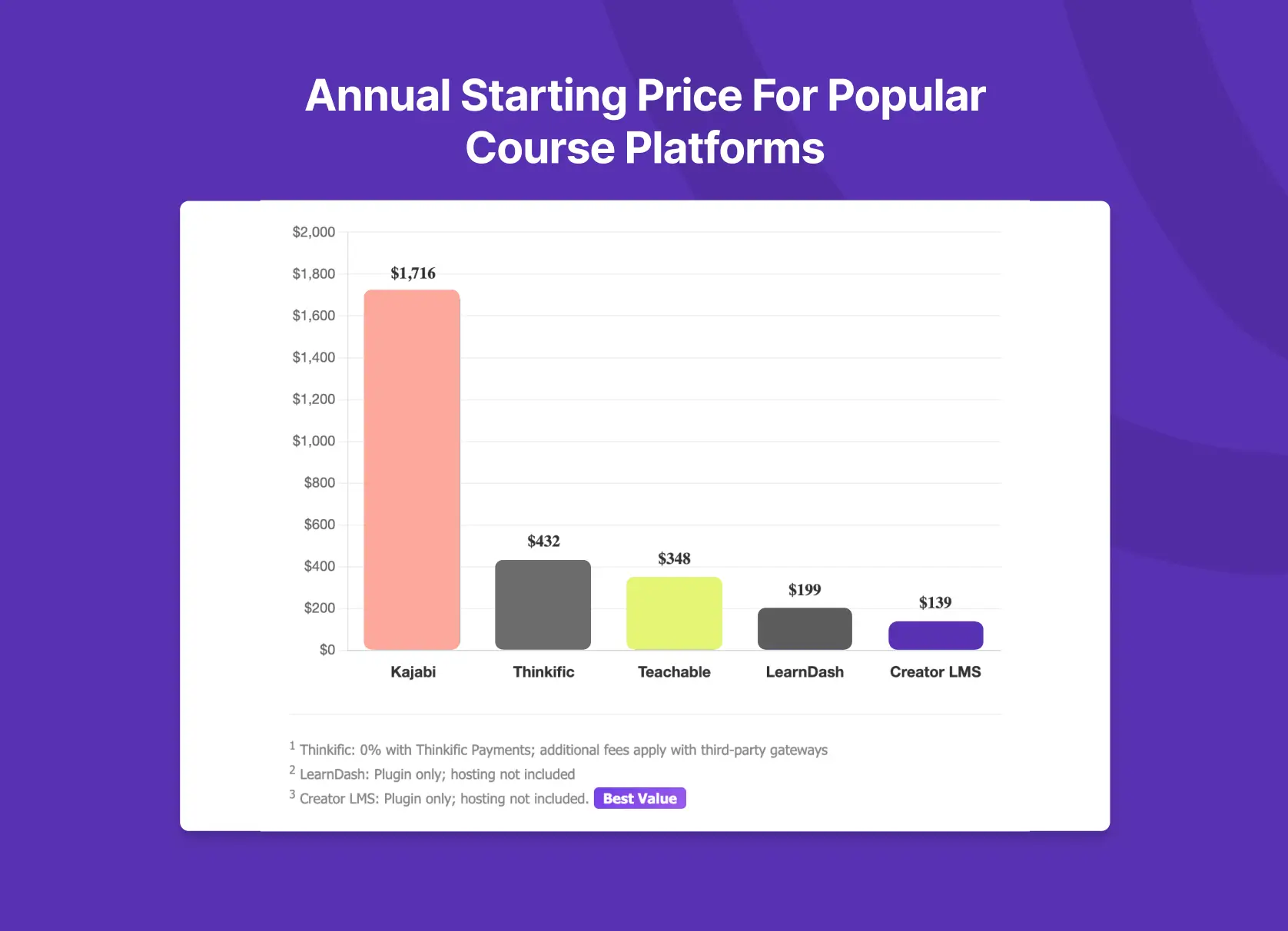
Online Course Platform Pricing Comparison (2026 Annual Plans)
| Platform | Starting Price | Transaction Fee | Course Limit | Student Limit |
|---|---|---|---|---|
| Kajabi | $1,716/year | 0% | 5 | 2,500 |
| Teachable | $348/year | 7.5% | 1 | 100 |
| Thinkific | $432/year | 0%1 | ∞ | 10,000 |
| LearnDash | $199/year2 | 0% | ∞ | ∞ |
| Creator LMS | $139/year3 | 0% | ∞ | ∞ |
- Thinkific charges 2-3% extra if you use Stripe or PayPal directly in certain countries.
- Any WordPress plugin needs hosting, email gateway, extra add-ons etc which add-on top of the plugin licenses.
- Creator LMS includes all of the add-ons inside the pro plugin. So you need a hosting subscription which starts from 60 US Dollars a year.
Now let me show you what these numbers actually mean for your business.
The SaaS Platforms: Convenient, But at What Cost?
Kajabi: Premium Price, Premium Limits
Kajabi’s pricing page shows $143/month on their Basic plan (billed annually). That’s $1,716 per year before you’ve enrolled a single student.
For that price, you get 5 products and 2,500 contacts. Sounds reasonable until you realize “contacts” means everyone- students, email subscribers, leads. Run a webinar to promote your course? Those registrants count against your limit.
I talked to a fitness coach last month who hit her contact limit four months after launching. Her options were to either delete leads she’d worked hard to capture or upgrade to the $199/month Growth plan. She upgraded. Her annual cost jumped to $2,388.
Kajabi doesn’t charge transaction fees, which is genuinely good. But when your base cost is this high, you need consistent revenue just to break even. If you’re earning $10,000+ monthly from courses, Kajabi’s all-in-one setup makes sense. If you’re still building your audience? That’s expensive rent for a shop with no customers.
What Kajabi costs in reality:
- Year 1 (Basic): $1,716
- Year 1 (Growth, if you hit limits): $2,388
- 3-year cost (Growth): $7,164
Teachable: The Transaction Fee Trap
Teachable changed their pricing structure in 2025, and not in a good way. They removed the free plan entirely and added hard caps on students and products that didn’t exist before.
Their current pricing starts at $29/month (annual), which looks affordable. But there’s a 7.5% transaction fee on that plan. Plus payment processing.
Let me do the math on a real scenario.
You sell a $150 course. On Teachable’s Starter plan:
- Transaction fee (7.5%): $11.25
- Payment processing (~3%): $4.50
- Total fees: $15.75 per sale
That’s 10.5% of your revenue gone. Sell 100 courses and you’ve paid $1,575 in fees alone, plus your $348 annual subscription. Your actual cost: $1,923.
To get 0% transaction fees, you need the Builder plan at $69/month ($828/year). But even then, you’re capped at 5 products and 1,000 students. The Growth plan removes most limits at $139/month ($1,668/year).
There’s another issue: Teachable limits third-party integrations based on your plan. Starter gets 1 integration. Builder gets 3. If you want to connect your email tool, your CRM, and your analytics? You need a higher plan.
What Teachable costs in reality (assuming 100 sales at $150):
- Starter plan: $348 + $1,575 fees = $1,923/year
- Builder plan (0% fees): $828/year
- 3-year cost (Builder): $2,484
Thinkific: The Most Reasonable SaaS Option
I’ll be honest here. If you’re set on a SaaS platform, Thinkific is probably your best bet in 2026.
Their Basic plan runs $36/month (annual) with unlimited courses and 10,000 students. No transaction fees if you use Thinkific Payments. That’s a meaningful difference from Teachable.
The catch is feature restrictions. Basic doesn’t include memberships, bundles, assignments, quizzes, or certificates. For most course creators, you’ll need the Start plan at $74/month to unlock those features.
Want to remove Thinkific branding from your site? That’s the Grow plan at $149/month.
There’s also a third-party payment gateway fee that Thinkific added. If you’re outside their supported countries for Thinkific Payments, or you prefer using your own Stripe account, you’ll pay an extra percentage on each transaction. This varies by plan and country, so check their docs.
What Thinkific costs in reality:
- Basic plan: $432/year (but missing key features)
- Start plan: $888/year
- Grow plan: $1,788/year
WordPress LMS Plugins: Lower Cost, More Control
Here’s where the math changes dramatically. WordPress LMS plugins charge a flat annual fee. No transaction fees. No student limits. No per-sale cuts.
The tradeoff is setup. You need hosting, a domain, and some comfort with WordPress. But if you can install a plugin, you can run a course business for a fraction of what SaaS platforms charge. Creator LMS offers a white glove installation and configuration service to assist you start selling your courses within a couple of minutes. You can book a call with us from the contact page.
LearnDash: The Industry Standard (With Add-On Costs)
LearnDash has been the default WordPress LMS for years. Their pricing starts at $199/year for a single site license.
For that price, you get unlimited courses, unlimited students, a solid course builder, and integrations with payment gateways like Stripe and PayPal. No transaction fees.
But here’s what the pricing page doesn’t emphasize: LearnDash is modular. The base plugin handles course delivery. Everything else is extra.
Want group management for cohorts or teams? That’s the Groups Management add-on: $99/year. Need detailed analytics? ProPanel is another $99/year. Instructor roles, gradebook, student notes, each one is a separate purchase!
A realistic LearnDash setup with groups, analytics, and instructor features runs $400-500/year. Still cheaper than SaaS, but more than the advertised $199.
You also need to factor in:
- Hosting: $60-150/year for decent WordPress hosting
- Theme: $0-60 (one-time)
- Page builder: $0-84/year (optional)
What LearnDash costs in reality:
- Plugin only: $199/year
- With common add-ons: $400-500/year
- Plus hosting/domain: $500-650/year
- 3-year cost (with add-ons): ~$1,500-1,950
Creator LMS: Everything Included at One Price
This is a Creator LMS blog, so take this section with appropriate context. But the pricing difference is significant enough that it’s worth explaining.
Creator LMS pricing starts at $139/year. That includes:
- Unlimited courses, lessons, quizzes
- Built-in checkout (Stripe, PayPal) with zero transaction fees
- Memberships and subscriptions
- Gamification (points, badges, leaderboards)
- Certificates
- AI course creation tools
- Automated emails
- Analytics
No add-ons required for those features. They’re included.
The Pro plan at $199/year adds email marketing automation, abandoned cart recovery, and WooCommerce integration. The Business plan at $399/year includes cohort courses, live classes via Zoom, community spaces, and one-click upsells.
The philosophy is different from LearnDash. Instead of a base plugin plus paid add-ons, Creator LMS bundles features that course creators actually need into each tier.
If you’re migrating from another LMS, there’s a direct import tool for LearnDash and Tutor LMS content.
What Creator LMS costs in reality:
- Starter plan: $139/year
- Plus hosting/domain: $80/year
- Pro plan (with email automation): $199/year
- 3 Year Cost (Business): $999
Three-Year Cost Comparison: The Real Numbers
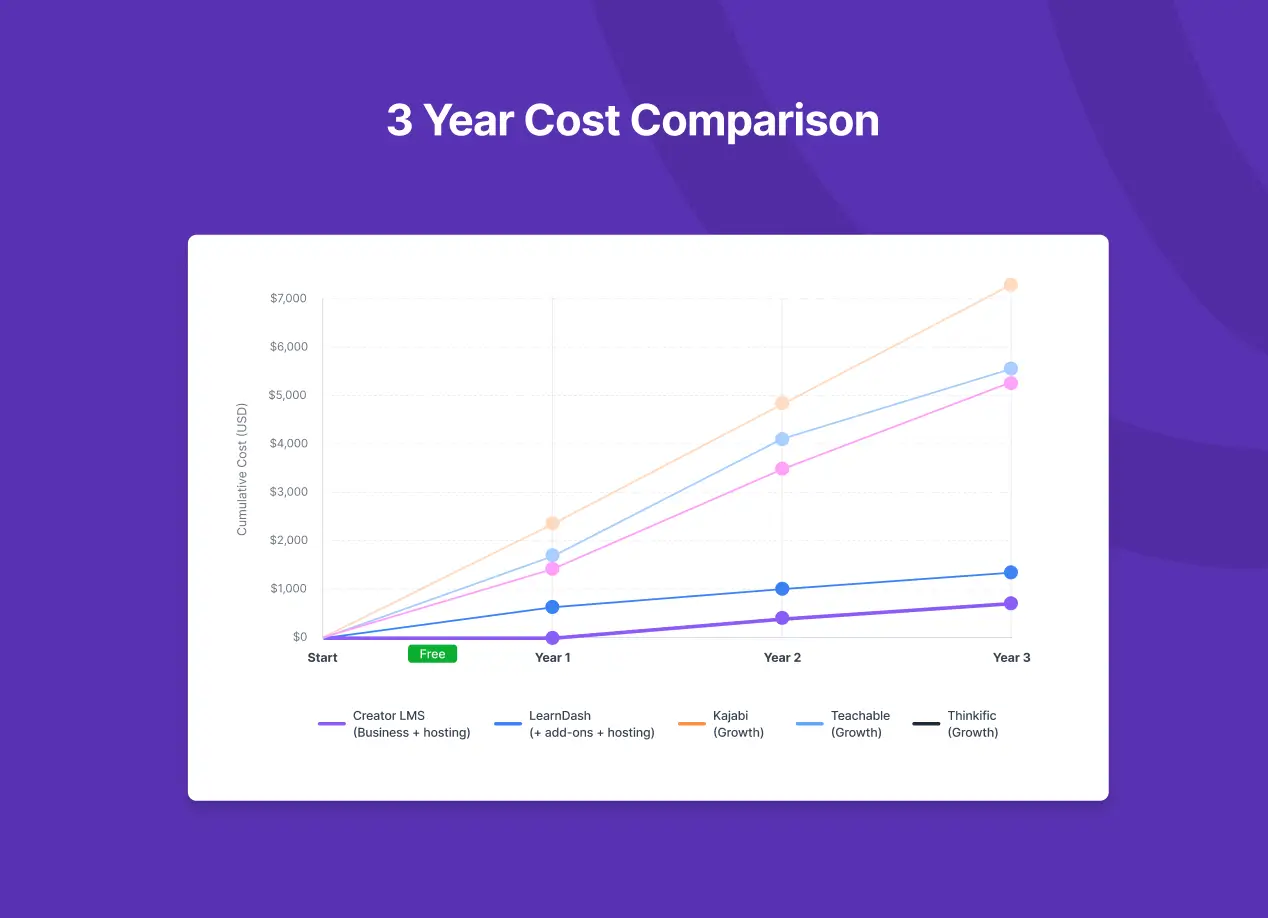
Let’s compare what you’d actually pay over three years for a course business with these features:
- Unlimited courses
- No transaction fees
- Email automation
- Student community or cohorts
| Platform | Annual Cost | 3-Year Total |
|---|---|---|
| Kajabi (Growth) | $2,388 | $7,164 |
| Teachable (Growth) | $1,668 | $5,004 |
| Thinkific (Grow) | $1,788 | $5,364 |
| LearnDash (+ add-ons + hosting) | $550 average | ~$1,650 |
| Creator LMS (Business + hosting) | $400 average | ~$1,200 |
The gap between SaaS and WordPress is around $4,000-6,000 over three years. That’s money for ads, content, equipment, or your pocket.
Which Online Course Platform is Right for You?
There’s no universal answer. It depends on your situation.
SaaS platforms (Kajabi, Teachable, Thinkific) make sense if:
- You have zero tolerance for technical setup
- Recurring monthly costs don’t stress you out
- You’re already earning consistent revenue from courses
- You value having one company handle everything
WordPress LMS (LearnDash, Creator LMS) makes sense if:
- You want to own your platform and student data
- You’re comfortable with basic WordPress (or willing to learn)
- Keeping 100% of your revenue matters to you
- You’re thinking about long-term costs, not just month one
Frequently Asked Questions
What is the cheapest online course platform in 2026?
Based on annual pricing, Creator LMS offers the lowest cost at $139/year with no transaction fees or student limits. LearnDash starts at $199/year. Among SaaS options, Teachable’s Starter plan is cheapest at $348/year, but the 7.5% transaction fee increases real costs significantly.
Is Kajabi worth the high price?
For established creators earning $5,000+ monthly from courses, Kajabi’s all-in-one system can be worth the cost. You’re paying for convenience and avoiding the complexity of connecting multiple tools. For creators still building their audience, the $1,700+ annual cost is hard to justify.
Do WordPress LMS plugins charge transaction fees?
No. Neither LearnDash nor Creator LMS charge transaction fees. You only pay standard payment processing fees to Stripe or PayPal (typically 2.9% + $0.30 per transaction). This is significantly less than Teachable’s 7.5% fee on their entry plan.
Can I switch from Teachable or Kajabi to WordPress?
Yes. Both LearnDash and Creator LMS offer content migration paths. Creator LMS has direct import tools for LearnDash and Tutor LMS. For Teachable or Kajabi, you’d export your content and re-upload it. Creator LMS has support for SCORM imports. You can contact the support team to get assistance with the migration process free of cost.
What hidden costs should I watch for with LMS platforms?
Common hidden costs include: transaction fees (Teachable), contact/student limits that force upgrades (Kajabi, Teachable), third-party payment gateway fees (Thinkific), required add-ons for basic features (LearnDash), and hosting costs (all WordPress options). Always calculate your total annual cost, not just the monthly subscription.
Is Creator LMS good for beginners?
Yes. Creator LMS was designed to avoid the complexity of installing and configuring. The interface is closer to SaaS simplicity than typical WordPress plugins. If you can use WordPress and install a plugin, you can run Creator LMS. The support team is always available to help you with anything you need to do for your courses.
Final Thoughts
The online course platform market wants you to focus on monthly prices and feature lists. But the real question is simpler: how much of your revenue will you keep?
On SaaS platforms, you’re paying for convenience with ongoing monthly costs and, in some cases, a cut of every sale. On WordPress, you’re paying for control with a one-time annual fee and full ownership of your business.
Neither approach is wrong. But if you’re serious about building a course business that grows without your costs growing faster, WordPress LMS plugins are your best bet. Creator LMS has the lowest cost and best support in the market.
Related Reading:
- Creator LMS vs Kajabi: Full Comparison
- Creator LMS vs LearnDash Comparison
- How to Create an Online Course for Free
- Creator LMS Features Overview
Pricing Pages Referenced: