

Creator LMS allows you to import courses directly into your LMS website. This makes it easy to migrate courses between sites, restore backups, or add SCORM-based learning content. Please note that this feature is available on the Pro version of the plugin.
Supported Import Types
Creator LMS currently supports:
- Creator LMS JSON Format
- Import courses that were previously exported from another Creator LMS website.
- SCORM Package
- Import courses packaged in SCORM 1.2 or SCORM 2004 format.
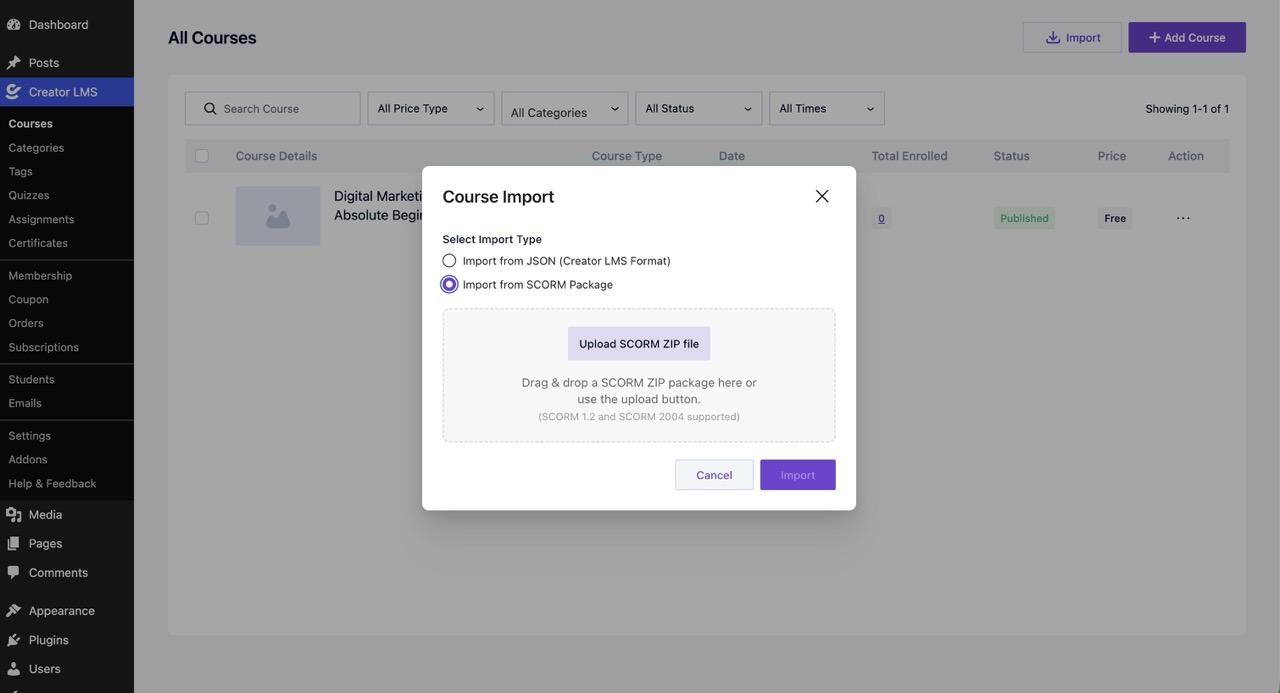
Importing a Creator LMS Course (JSON)
Use this option when importing a course that was exported from another Creator LMS website.
Steps
- Click Import.
- Select Import from JSON (Creator LMS Format).
- Upload the exported JSON file.
- Click Import.
Creator LMS will create the course and import the associated course data from the file.
Need to import courses from an unsupported platform or create your own JSON import file?
Simply export a sample course from any Creator LMS installation. The exported file will show you the exact JSON structure expected by Creator LMS, making it easier to prepare and import your own course data.
Importing a SCORM Course
Use this option to import courses created with SCORM-compliant authoring tools such as Articulate Storyline, Adobe Captivate, iSpring, or similar platforms.
Supported Standards
- SCORM 1.2
- SCORM 2004
Steps
- Click Import.
- Select Import from SCORM Package.
- Click Upload SCORM ZIP File.
- Select your SCORM ZIP package.
- Click Import.
Alternatively, you can drag and drop the SCORM ZIP file into the upload area.
Once the upload is complete, Creator LMS will create a new course using the content contained in the SCORM package.
Important Notes
- Upload the SCORM package as a ZIP file.
- Do not extract the ZIP file before uploading.
- Ensure the package contains a valid SCORM manifest file (
imsmanifest.xml). - Only SCORM 1.2 and SCORM 2004 packages are supported.
- Large SCORM packages may take longer to upload and process depending on your server configuration.
Troubleshooting
Import Button Does Not Work
- Make sure you have the Pro version of the plugin installed and activated.
- The license is active and valid.
SCORM Package Fails to Import
- Verify that the package is a valid SCORM 1.2 or SCORM 2004 package.
- Ensure the ZIP file contains the required
imsmanifest.xmlfile. - Check your PHP upload limits if the file is large.
Upload Gets Stuck
- Increase your server’s:
upload_max_filesizepost_max_sizemax_execution_timememory_limit
- Contact your hosting provider if needed.
